How to Know if Someone Screenshots Your Instagram Story
Instagram stories feel personal and fleeting, which is exactly why so many people wonder how to know if someone screenshots your Instagram story. You share a moment thinking it disappears after 24 hours, but the idea that someone might capture and keep it changes how you feel about posting. This concern has grown alongside Instagram’s evolving privacy features, and understanding what the platform actually tells you can save you a lot of unnecessary worry.
The truth is more nuanced than most people expect. Instagram has changed its screenshot notification policy multiple times over the years, and the current system works differently depending on what type of content you’re sharing. Let’s break down exactly what Instagram reveals, what it doesn’t, and how you can protect your privacy regardless of the answer.
Does Instagram Notify You About Story Screenshots?
Here’s the short answer: for regular Instagram stories, Instagram does not notify you when someone takes a screenshot. This wasn’t always clear to users, and plenty of confusion still exists because Instagram briefly tested screenshot notifications for stories years ago before eventually dropping the feature for standard posts.
Today, if someone screenshots your regular story, whether it’s a photo, a boomerang, or a video clip, you won’t get an alert. The person can save your content to their camera roll without you ever finding out through any built-in notification system.
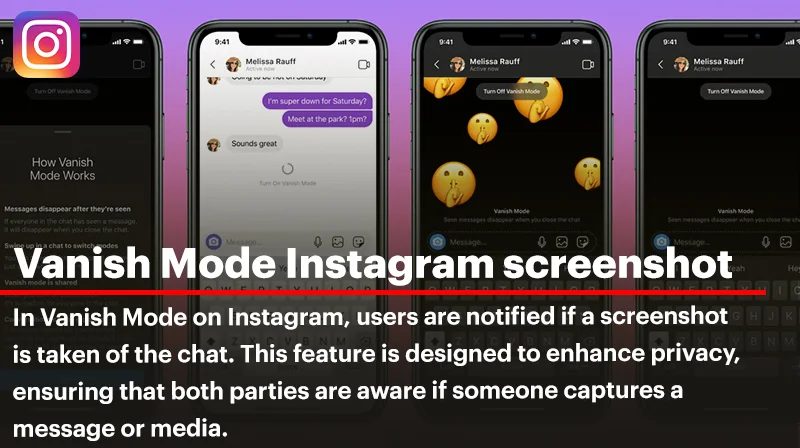
This differs significantly from disappearing messages sent through Instagram Direct, where Instagram does notify you if someone takes a screenshot of a photo or video set to disappear after viewing. That distinction trips up a lot of users who assume the same rule applies everywhere on the app.
Why Instagram Doesn’t Alert You for Regular Stories
Understanding the reasoning behind this policy helps explain how to know if someone screenshots your Instagram story in practical terms. Instagram stories were designed as a broadcast feature, meant to be seen by potentially hundreds or thousands of followers. Notifying you every time one of those viewers took a screenshot would create constant, often meaningless alerts, especially for public accounts or influencers with large followings.
Imagine posting a story that gets 500 views, and then receiving screenshot notifications from a large chunk of those viewers. The feature would quickly become more annoying than useful, cluttering your notifications with information that rarely matters for casual, everyday content.
Instagram made a deliberate choice to prioritize disappearing direct messages for screenshot alerts because those interactions are private, one-on-one, and often involve more sensitive content. A story broadcast to your entire follower list operates under a different privacy expectation than a private message meant for a single recipient.
What You Can Actually See About Story Viewers
While screenshot detection isn’t available, Instagram does give you meaningful data about who’s engaging with your story. Understanding these tools is the closest you’ll get to answering how to know if someone screenshots your Instagram story, since you can at least monitor who’s viewing your content closely.
The Story Viewer List
Every story you post includes a viewer list, accessible by swiping up on your own story or tapping the eye icon at the bottom. This shows exactly who watched your story, in roughly chronological order based on their viewing time, with your closest and most frequent viewers often appearing near the top.
This list stays available for 24 hours while the story is active, and afterward it moves into your archive if you have that setting enabled. While it won’t tell you if someone screenshotted your content, it does show you who’s paying attention to your posts.
Repeat Viewers and Engagement Patterns
If you’re trying to figure out who might be screenshotting your stories, pay attention to patterns rather than expecting direct confirmation. Someone who views every single story you post, watches till the very end repeatedly, or reacts frequently might be more invested in your content than a casual follower.
This doesn’t prove screenshotting behavior, but it can help you identify people who are unusually attentive to what you share, which is often the underlying concern driving the original question.
Close Friends Stories and Screenshot Behavior
Instagram’s Close Friends feature adds another layer to this conversation. When you post to Close Friends, only the people on your selected list can view it, and the list itself functions the same way as a regular story in terms of screenshot notifications.
Even within Close Friends stories, Instagram does not alert you if someone takes a screenshot. Many users assume this smaller, trusted circle comes with extra protections, but the platform treats it identically to a public story when it comes to screenshot detection. If you’re sharing something particularly private, don’t rely on the Close Friends label alone to prevent screenshots from happening unnoticed.
Instagram Direct Messages Versus Stories
To fully understand how to know if someone screenshots your Instagram story, it helps to compare the story mechanism with Instagram’s direct messaging system, since the two are often confused.
In Direct Messages, when you send a photo or video configured to disappear after being viewed once, Instagram does notify the sender if the recipient screenshots it before it vanishes. This applies specifically to vanish mode and disappearing media, not to regular text conversations or permanent photo shares within a chat.
Stories don’t carry this same disappearing-message logic, even though they also vanish after 24 hours. The temporary nature of a story doesn’t trigger the same protective screenshot alert that ephemeral direct messages do, which is an important distinction to keep in mind when sharing sensitive content on either platform feature.
Third-Party Apps That Claim to Detect Screenshots
A quick search will turn up numerous apps and browser extensions claiming they can tell you if someone screenshotted your Instagram story. Be extremely cautious here. Instagram’s official API doesn’t provide this kind of data to third-party developers, meaning any app promising screenshot detection is either misleading you or potentially compromising your account security.
These apps often require you to log in with your Instagram credentials, which puts your account at serious risk of being hacked, banned, or used for spam and phishing schemes. Instagram actively works to shut down apps that violate its terms of service by requesting login credentials for unauthorized data access. If an app claims to answer how to know if someone screenshots your Instagram story with certainty, treat that claim as a red flag rather than a helpful feature.
Protecting Your Privacy Without Screenshot Alerts
Since Instagram won’t tell you directly, the more productive approach is focusing on privacy strategies that reduce your exposure rather than chasing screenshot notifications that don’t exist for stories.
Adjust Who Can See Your Stories
Go into your privacy settings and review who has access to your story content. You can hide your story from specific people entirely, switch to a private account so only approved followers see your posts, or use the Close Friends list for content meant for a smaller, more trusted audience.
Think Before You Post Sensitive Content
The safest way to prevent unwanted screenshots is simply being mindful of what you share. If a story contains something you’d be uncomfortable having saved and circulated, consider whether posting it publicly is worth the risk, regardless of whether Instagram would notify you about a screenshot.
Use Disappearing Messages for Sensitive One-on-One Sharing
If you want actual screenshot protection, sending content through Direct Messages with vanish mode enabled gives you the notification safeguard that stories lack. This makes direct messaging a better option than stories for anything you specifically want to track for screenshot activity.
Restrict or Block Suspicious Accounts
If you suspect a specific person is repeatedly screenshotting and misusing your content, you have options beyond just wondering about detection. Restricting or blocking that account limits their access to your stories altogether, removing the concern entirely rather than trying to catch them in the act.
Common Misconceptions About Story Screenshots
Many users still believe Instagram used to notify people about story screenshots and quietly removed the feature, which adds to the confusion. In reality, Instagram briefly tested this notification for stories years ago in a limited capacity, then discontinued it broadly, leading to lingering myths that persist across social media discussions today.
Another common misconception is that screen recording triggers a different kind of alert than a standard screenshot. It doesn’t. Whether someone takes a static screenshot or records their screen while your story plays, Instagram treats both the same way: no notification is sent to you either way.
Final Thoughts on Story Privacy
At the end of the day, how to know if someone screenshots your Instagram story comes down to accepting that Instagram doesn’t provide this information for standard stories, and no legitimate tool can reliably give it to you either. The platform’s focus remains on disappearing direct messages for screenshot alerts, leaving stories without that same layer of transparency.
Rather than searching for a workaround that doesn’t exist, focus your energy on managing your privacy settings, being thoughtful about what you share, and using features like Close Friends and account restrictions to control who sees your content in the first place. This proactive approach protects you far more effectively than chasing a notification system Instagram simply hasn’t built for stories.
SEO Category: Informational